I had been trying to get my categories mapped to QBO, and yes, they are mapped. Actually, my categories were changed to cost codes, I believe, but they do not seem to appear in my cost in an estimate. The program asks for a category for an item on an estimate, but none appear in the drop-down. I’m sure it’s something that hasn’t been set up correctly, but I’m at a loss for where to look for errors.
1 Like
Hi @Craig_Fairbanks - When you switch to cost codes, it enables a 2-tier job costing system vs our standard 1-tier category system. This means you can get more granular on an Estimate.
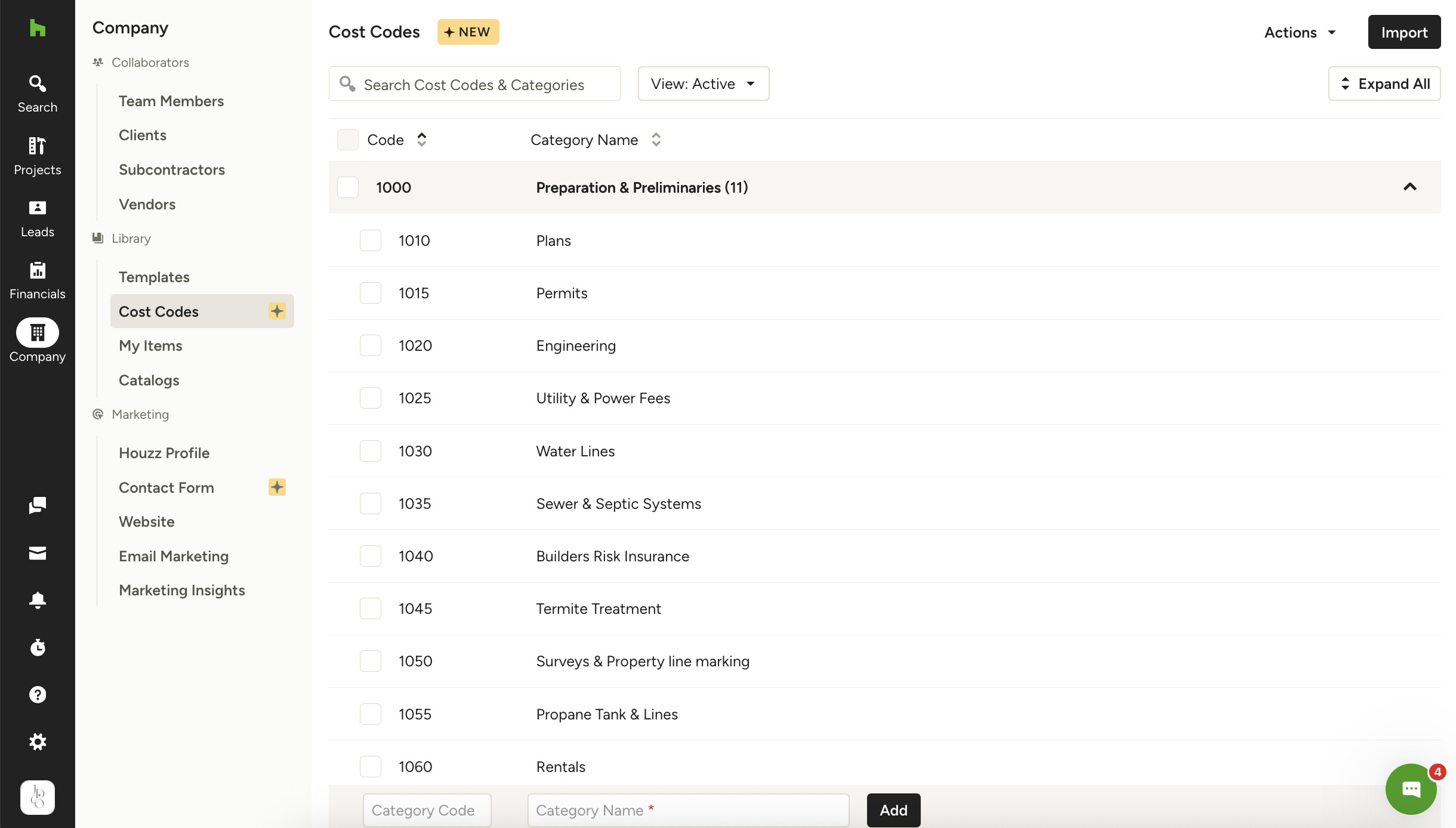
On this first screenshot, you see my Cost Categories and there is a number in parentheses next to each. That number represents how many cost codes are tied to that cost category. I can also click the drop down to expand and view more. See second screenshot. You’ll notice the cost codes are more broken down tasks that all fall under Prep.
We recommend you use both Cost Categories and Cost Codes for the best experience. When you switch from Categories, your Categories turn into Cost Categories, but you’ll want to add Cost Codes beneath each to get the full power of Cost Codes. If you’d like to check your setup, click Company in the left navigation and then click Cost Codes. You can adjust as you like from that screen. Also, in the top right corner under Actions, you can manage your QBO settings.
Once you’re set, you’ll be able to add Cost Codes to your Estimate from a few places on the Estimate. See 3rd screenshot.
You and I have time set up to connect 1:1 Thursday as well so I’m looking forward to that and we can walk through this all live and will answer any other questions you have! 


1 Like
Hello, I have a Houz Pro Account, I am trying to find cost codes. I do not see that line item under Library. How do I get this option with my subscription?
1 Like
Hi Gavin! We are just starting to roll the feature out publicly this week - it’s been in Beta testing for a few months. I will have our engineers go ahead and add the feature to your account. 
1 Like